Your SEO plugin shows a perfect title tag. Your theme prints a different H1. Google shows something slightly different in search results. Users land on a page where the headline doesn’t match what they clicked. Confusion everywhere.
Meta title (title tag) and H1 serve related but different jobs. WordPress stacks theme, plugin, and page builder layers — duplicates and mismatches are default unless you configure intentionally.
Here’s how to set meta title vs H1 correctly on WordPress without keyword-stuffing both into the same string.
Title Tag vs H1: What Each Does
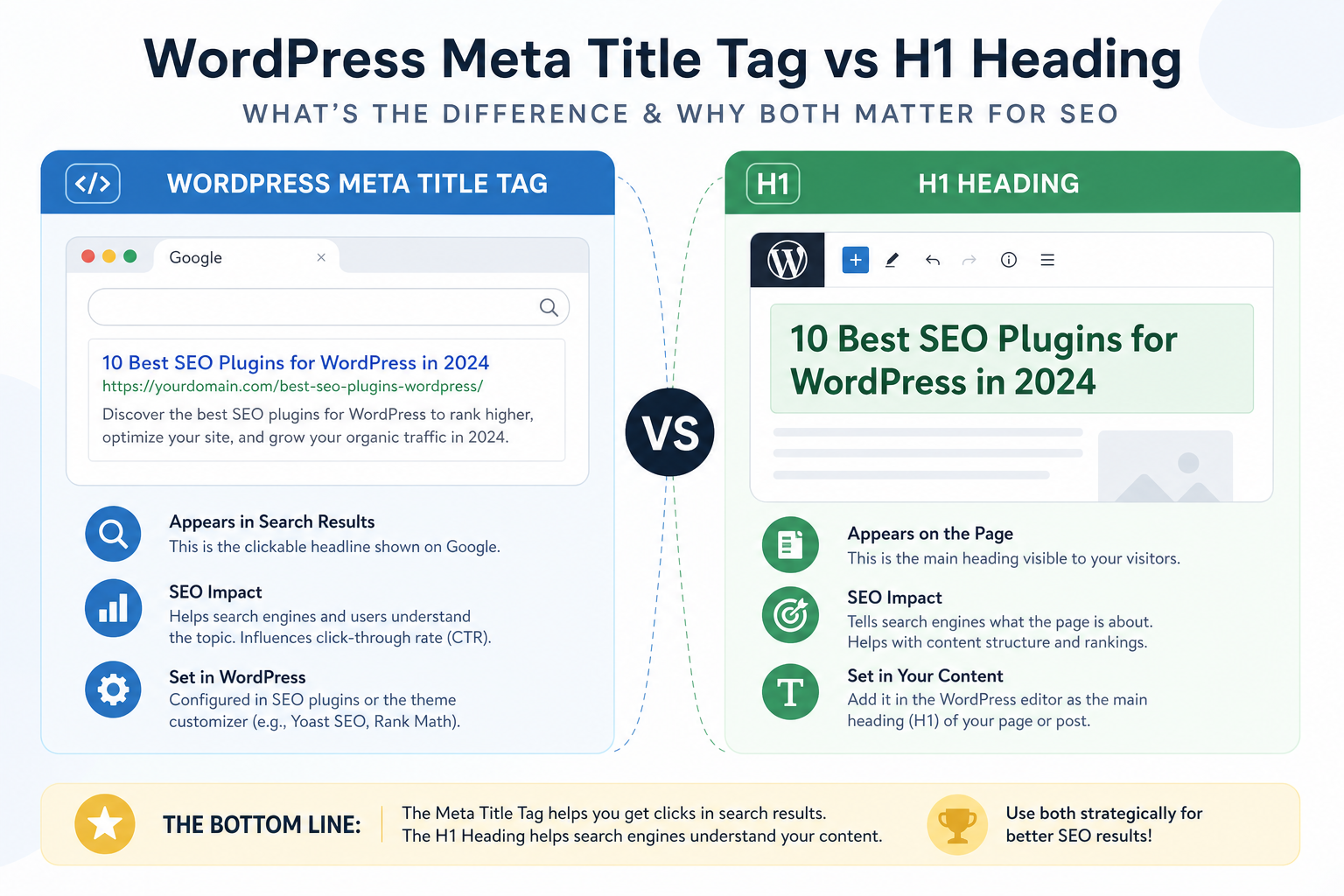
Title tag (<title>): Browser tab, bookmark, primary SERP headline. Often includes brand suffix. Optimized for search snippet length.
H1: On-page main heading — what visitors see first. Can be longer, more conversational, brand-free.
They can differ. They shouldn’t contradict. They must never duplicate two H1s or two titles from competing sources.
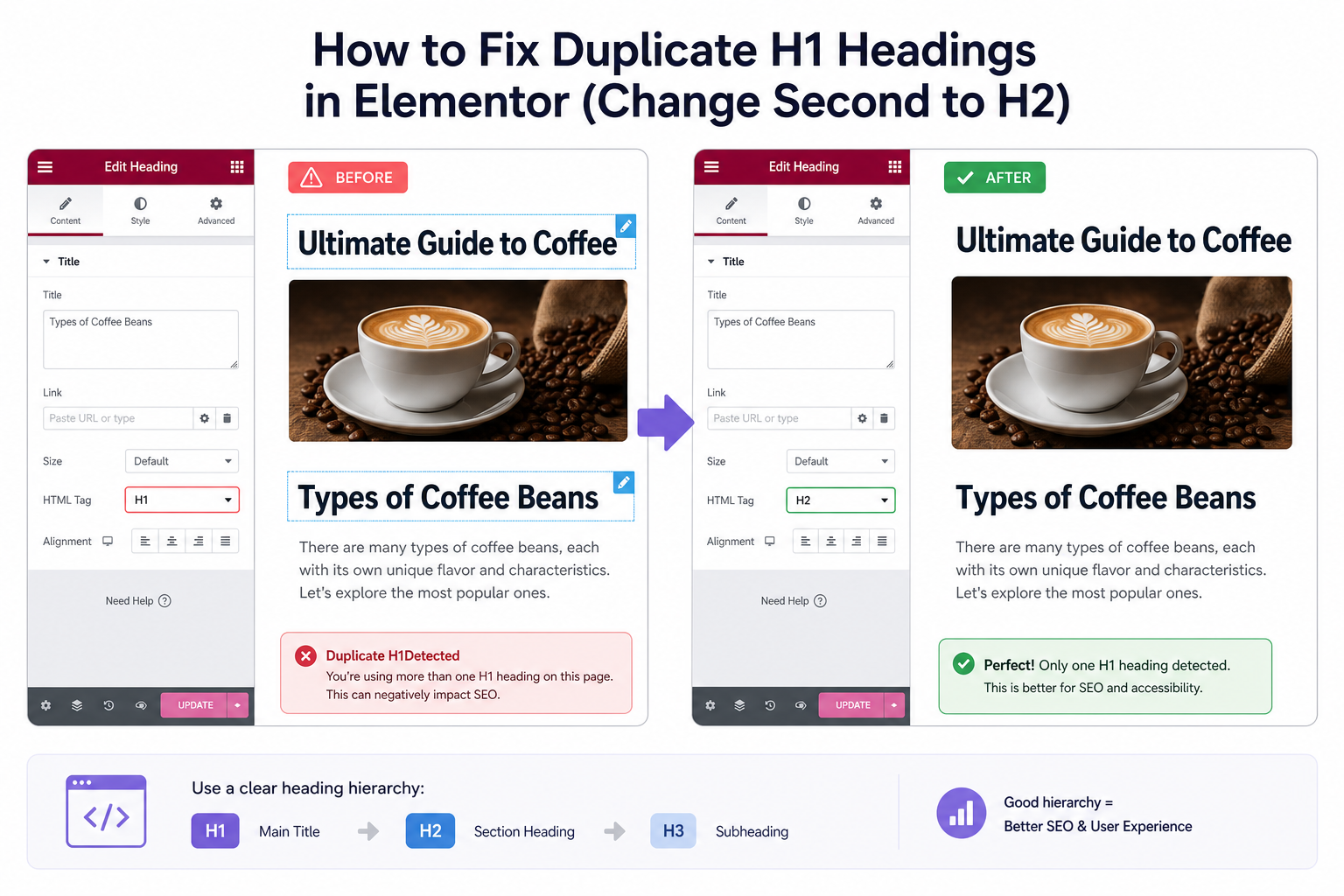
Mistake 1: Two H1 Tags on One Page
Theme H1 for post title + page builder H1 in hero + SEO plugin doesn’t fix it. Google can usually figure it out — bad for accessibility and clarity.
Fix: One H1 per page. Theme typically owns it on posts; remove extra H1 blocks in Elementor/Div layouts or demote to H2.
MiroPage and manual review catch heading skips — pre-publish checklist.
Mistake 2: Title Tag Same as H1 + Site Name Twice
H1: “Best Running Shoes for Flat Feet” Title: “Best Running Shoes for Flat Feet | Store | Store Name” — fine.
H1 includes full title tag verbatim PLUS theme adds site name again in title — redundant, truncates badly.
Fix: SEO plugin title template with %%title%% and %%sitename%% once. H1 stays clean product/post name.
Mistake 3: Empty SEO Title, Theme Defaults Wrong
SEO title blank — theme uses “Post Name | Tagline from 2019.” Generic snippets, weak CTR. Write intentional titles — meta description guide pairs with this.
Mistake 4: H1 Hidden or Missing on Landing Pages
Page builder hero with image text only — no H1 in HTML. SEO title exists; on-page structure weak for users and crawlers.
Fix: Visible H1 in HTML, even if styled small. Match intent with title tag.
Mistake 5: WooCommerce Product Title = H1 Only
Usually correct — product name is H1. SEO title adds category or brand: “Nike Peg 40 | Running Shoes | Store” while H1 stays “Nike Peg 40.” Good pattern.
Don’t rewrite H1 to keyword blob; extend title tag slightly for search context.
Should Title and H1 Match Exactly?
Not required. Recommended patterns:
- Blog posts: H1 = reader headline; title tag can add clarifier or year if useful
- Pages: Often similar; title may include brand
- Products: H1 = product name; title adds category/brand
Avoid completely different intents — title promises “pricing,” H1 says “about us.”
Theme vs SEO Plugin: Who Wins?
SEO plugin should control title tag via wp_title / document title filters. Theme should output single H1 in template.
Page builders override both — set SEO title in plugin, one H1 in layout, disable theme duplicate title in builder template.
Duplicate Title Tags Across URLs
Separate issue — same title on many URLs. Template fix — duplicate titles guide. H1 duplicates often come with title duplicates on archives.
Audit Checklist
- View source — count H1 and title tags
- Compare SERP title (GSC) vs your SEO plugin title
- Spot-check 5 URLs: post, page, product, category, homepage
- Fix page builder templates once, not per page
Tools
- MiroPage SEO — title + heading audit at publish
- Citence — site-wide title/H1 issue queue
The takeaway
Meta title vs H1 on WordPress: one title tag from SEO plugin, one H1 from theme or builder, related messaging but not redundant duplication. Fix double H1s, write intentional title tags, keep H1 human-readable. Conflicting layers confuse users and weaken on-page clarity — configure once per template, not firefight per URL.