One redirect is normal. HTTP to HTTPS. Old slug to new slug. www to non-www. Three redirects in a row — A to B to C to D — and Google loses patience, users lose milliseconds, and link equity evaporates like water through a sieve.
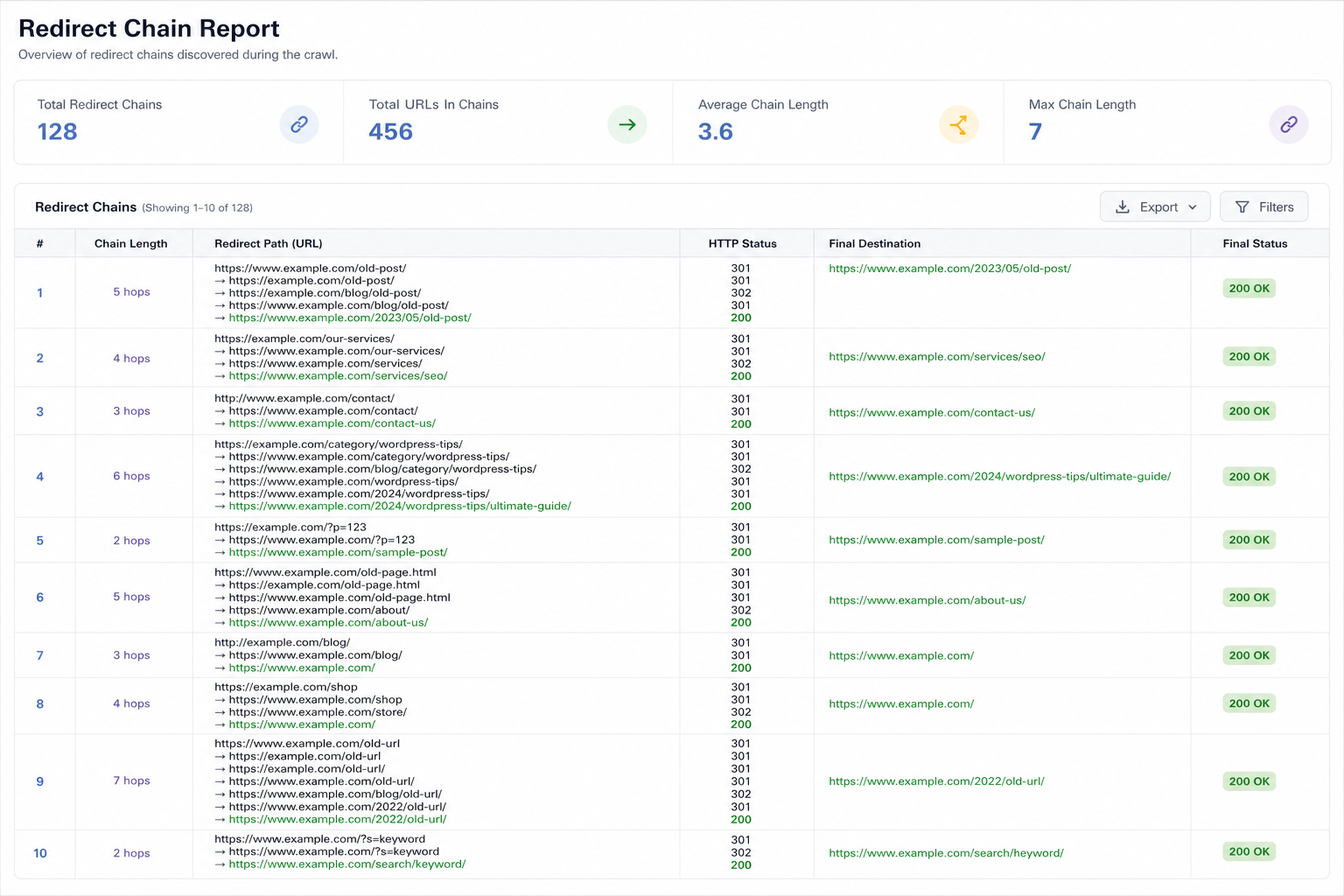
Redirect chains on WordPress pile up silently: migration plugin adds 301, SEO plugin adds another, htaccess adds a third, then someone edits a slug and creates a fourth hop. You never notice until a crawl export shows 4-step chains on your top landing pages.
Here’s how to find redirect chains, fix them, and prevent new ones after migrations and permalink changes.
What Counts as a Redirect Chain
Chain: URL A → 301 → B → 301 → C → 200. Crawler and browser follow each hop.
Loop: A → B → A. Crawler stops. URL effectively broken.
Good: A → 301 → C (final). One hop to destination.
Google recommends minimizing redirect chains. One hop is ideal for permanent moves.
Why Chains Hurt WordPress SEO
- Slower crawl — budget wasted on hops
- Diluted link equity — external links point to A, value bleeds through hops
- Slower page load — mobile users feel every redirect
- Indexing delays — canonical confusion on messy paths
- Analytics noise — referral paths break across hops
Post-migration chains overlap with broken internal links — fix both in same audit pass.
Common WordPress Chain Causes
1. Slug changed twice
/old-post/ → /medium-post/ → /final-post/ because SEO “improved” slug twice without updating first redirect.
2. HTTP + www + trailing slash rules stacked
http://site.com/page → https://site.com/page → https://www.site.com/page → https://www.site.com/page/
Fix: Consolidate server rules to one canonical hop — pick https + www OR non-www in one redirect.
3. Plugin + server both redirect
Redirection plugin 301 + Cloudflare page rule + host force SSL — each adds hop.
4. WooCommerce product URL changes
Category base change, product slug edit, old variable URL still redirecting through parent.
5. Soft redirects
JavaScript or meta refresh chains — worse than 301 chains. Use real 301/308.
How to Find Redirect Chains
- Screaming Frog — Reports → Redirect Chains
- curl
curl -I -L --max-redirs 10 URL— count hops - Browser devtools Network — follow redirect waterfall
- Search Console URL Inspection — redirect path shown
- After migration — crawl top 100 URLs from GSC
Citence site audits help catch redirect and canonical issues in batch after large changes.
Fix Workflow
Step 1: Map final URLs
Spreadsheet: old URL → final URL (200). One row per legacy path.
Step 2: Flatten to single 301
Every old URL redirects directly to final — not to intermediate. Update Redirection/Rank Math/htaccess rules.
Step 3: Update internal links
Point links to final URL — stop linking to A when A redirects to C. Same as migration link cleanup.
Step 4: Update sitemap and canonicals
Sitemap lists only final URLs. Canonical self-references final — canonical mistakes guide.
Step 5: Re-crawl and verify one hop
Redirect Plugin Best Practices
- One redirect manager — Redirection OR Rank Math OR server, not all three fighting
- Regex rules carefully — broad patterns create accidental chains
- Document slug changes — update existing redirect target instead of adding new layer
- 410 for gone forever vs 301 to homepage spam
Discontinued products: 301 to relevant product/category — out-of-stock SEO guide.
WooCommerce-Specific Notes
Permalink changes (remove /product/ base, etc.) affect thousands of URLs. Plan redirect map BEFORE toggling settings. Test sample products across categories.
Prevention Checklist
- Never change slug without checking existing redirects to that URL
- Consolidate http/www in one server config
- Staging blocked — staging indexed fix — avoid cross-environment redirect mess
- Quarterly chain audit on top 50 URLs by traffic
Tools
- Citence Pro — redirect/canonical audit patterns
- Citence audit workflow
The takeaway
Redirect chains on WordPress come from stacked plugin rules, double slug edits, and http/www normalization layers. Find with crawl tools, flatten every legacy URL to one 301 directly to final destination, update internal links to match. One hop — not four — is the target.