Internal linking is the most boring part of SEO. Nobody sells a course called “Become a Master of Contextual Anchor Text.” So most WordPress site owners either ignore internal links completely or do them in a way that looks spammy to Google and useless to readers.
Both hurt you.
Internal links tell Google which pages matter, how topics connect, and what to crawl next. They also keep real humans reading — if you link to helpful next steps instead of dead ends.
Here are the mistakes we see on WordPress sites over and over, and a dead-simple way to fix them without turning every paragraph into a link farm.
Mistake 1: Publishing Posts That Link to Nothing (Including Your Own Site)
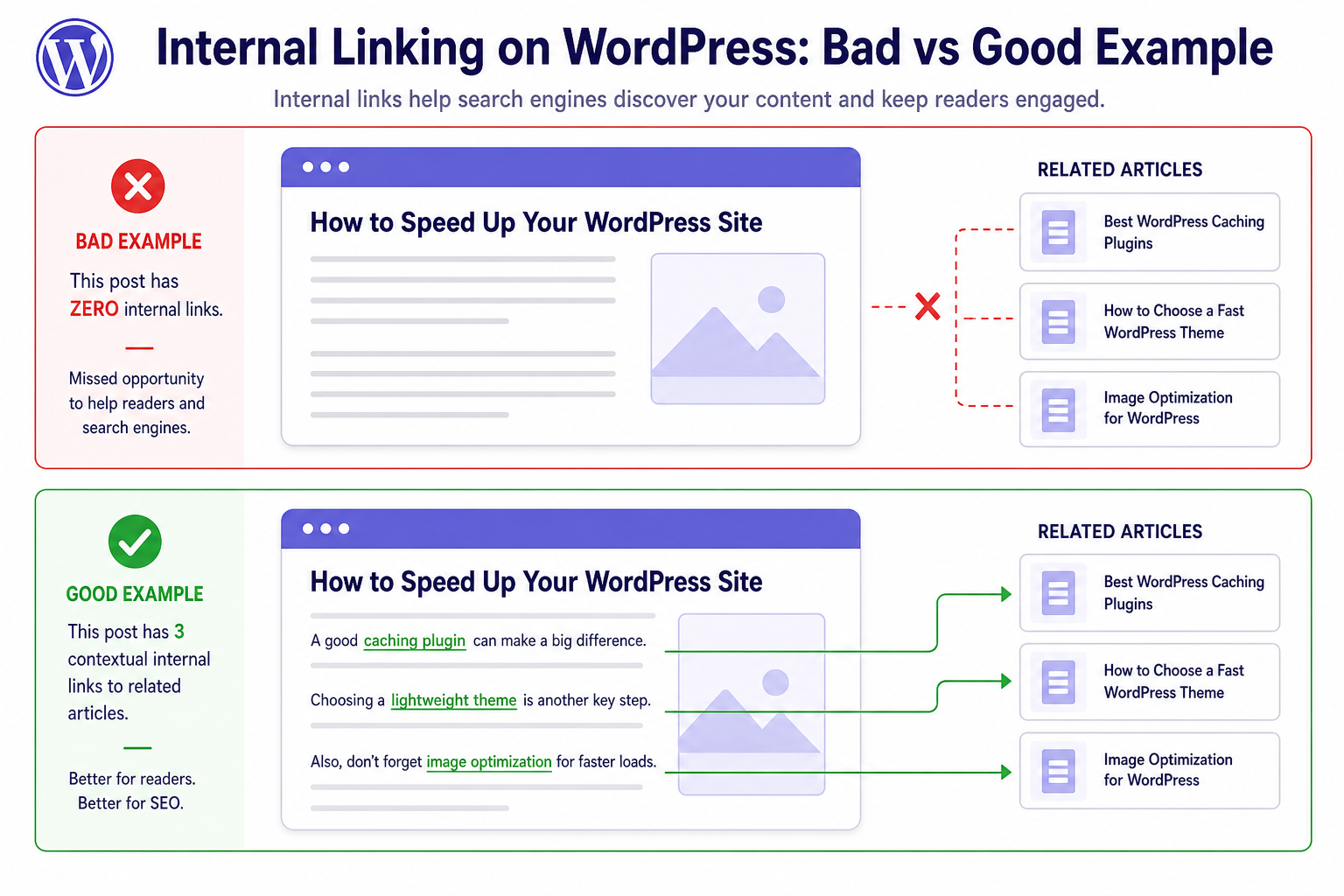
New post goes live. It’s 1,400 words. It links to three external “authority” sites for credibility. It links to zero of your own pages.
Congratulations — you just sent all your authority out the door and kept none in the family.
Every substantial post should link to at least 2–3 relevant pages on your site when it makes sense for the reader:
- Related guides
- Product or tool pages that solve the problem you’re discussing
- Pillar content on the same topic cluster
If nothing on your site is relevant, that’s a content strategy problem, not an internal linking problem.
Mistake 2: Forcing Exact-Match Anchor Text Everywhere
You read that internal links should use keywords. So every link says “best WooCommerce cart recovery plugin” in identical wording across 40 posts.
That pattern looks manipulative because it is.
Mix natural anchors:
- Descriptive phrases (“our guide on cart recovery emails”)
- Partial matches (“fix abandoned cart issues”)
- Brand/product names when linking to your tools
- Occasional generic (“this post”) — sparingly, when it reads better
Write for the sentence first. The anchor should fit if someone read it aloud.
Mistake 3: Only Linking From the Sidebar or Footer
Sidebars full of “Recent Posts” or “Popular Posts” aren’t useless — they’re just weak compared to in-content links.
Google gives more weight to links inside the main body content because those are editorial choices tied to the topic on the page.
Put the important links in the article where the context is obvious. “If indexing is your issue, start with our Search Console checklist” beats a random sidebar widget linking to the same post from every URL on the site.
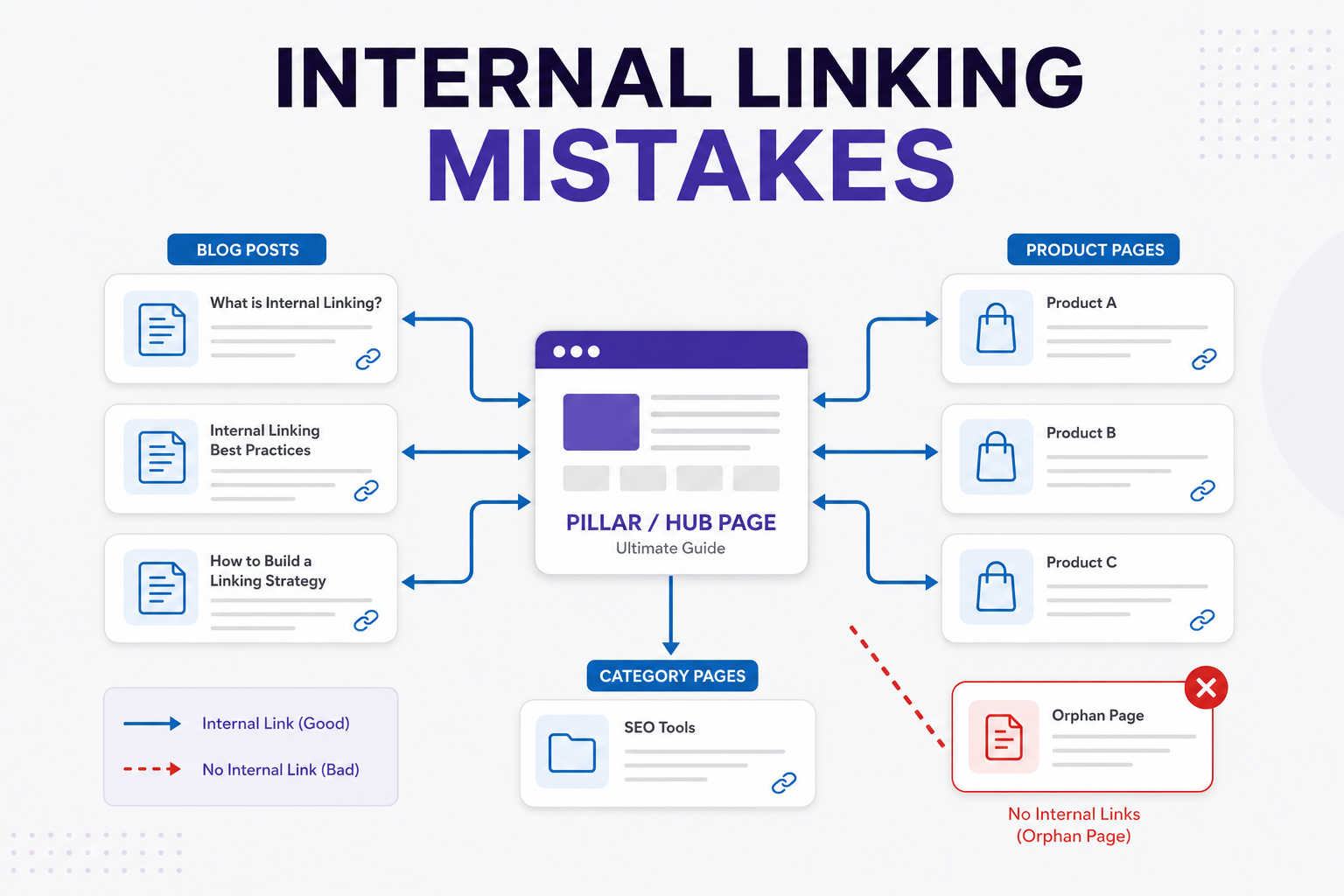
Mistake 4: Orphan Pages Nobody Can Find (Except Googlebot via Sitemap)
Orphan pages are URLs with no internal links pointing to them. The sitemap still lists them. Google might crawl them once and shrug.
This is how good content dies quietly.
When you publish something new, add one link from an older related post. Update the old post’s “
Orphan pages: Find and fix WordPress pages with zero internal links.
Related reading” section if you have one. It takes five minutes and compounds over time.
Run a quick audit: pick five important URLs and search your site for links to them (site:yourdomain.com “slug” in Google, or use a crawler if you have one). Zero results? Fix it.
Mistake 5: Linking to the Wrong Version of the URL
HTTP vs HTTPS. With vs without trailing slash. /blog/post vs /post if your permalinks changed during a migration.
WordPress usually canonicalizes, but messy internal links dilute signals and confuse crawlers. Pick one format and stick to it in every manual link you add.
After permalink changes, audit internal links in key posts — not fun, but cheaper than losing rankings you didn’t notice slipping.
Mistake 6: Tag and Category Pages Eating Your Crawl Budget
Every tag you create is another archive page. Link to all of them from widgets and footers and you’re telling Google to spend time on low-value URLs instead of your money pages.
Be intentional:
- Fewer, meaningful categories
- Don’t tag posts with 15 synonyms
- Noindex tag archives if you’re not actively maintaining them as landing pages
Internal linking structure should funnel attention toward pages you want to rank — not every auto-generated archive WordPress creates by default.
A Simple Internal Linking Workflow That Doesn’t Suck
When you publish or update a post, run this checklist:
- Outbound (from new post): Link to 2–3 related posts and 1 money page if relevant
- Inbound (to new post): Add a link from at least 1 older post that mentions the same topic
- Anchor text: Read it out loud — would a human click this?
- Hub page: If you have a pillar guide on the topic, link both ways between pillar and cluster posts
That’s it. No spreadsheet required until you’re managing 200+ posts.
How This Ties to Rankings and Indexing
Weak internal linking shows up as:
- New posts stuck at “Discovered – currently not indexed”
- Good posts that never move past page 4
- Wrong URL outranking the page you actually wanted to promote
Pair this with our posts on posts not ranking and crawled-not-indexed fixes if Search Console is already yelling at you.
MiroPage SEO flags internal linking gaps as part of its pre-publish audit — useful when you’re batching content and don’t trust yourself to remember the inbound link step every time.
After a migration? How to fix broken internal links after a WordPress migration.
The takeaway
Internal linking isn’t a hack. It’s site architecture for humans and crawlers.
Stop orphaning good content. Stop keyword-stuffing anchors. Link inside the body where context lives. Funnel attention to the pages that earn you traffic and revenue.
Boring? Yes. Works? Also yes.